


Website Templates
Below are four ways to integrate Sunbit onto your website and digital flows:
For groups with multiple locations ›
Embed an “As Low As” widget to an existing webpage ›
Add specials that you’d like to feature and highlight Sunbit’s “as low as” pricing for up to 9 items.
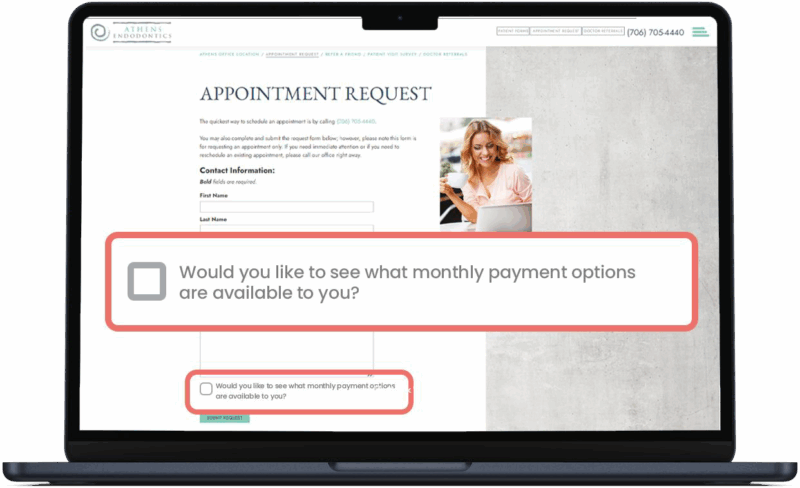
Add to your appointments page ›
Web – Single Location
To add your store’s custom pre-qualification page to your website, follow the directions below.
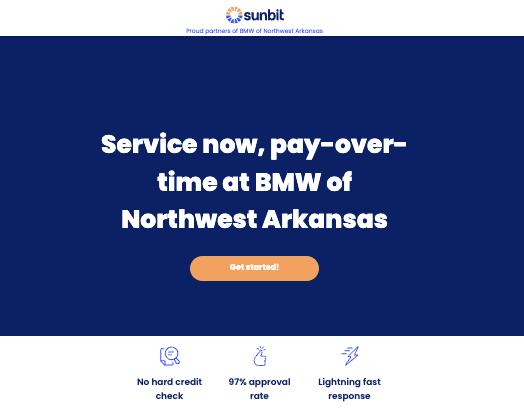
Click to view Single Location Iframe Code
<!-- ============================================ -->
<!-- SUNBIT SINGLE LOCATION IFRAME -->
<!-- UPDATE: Replace STORE_NAME_1 in the src URL with your store's Sunbit URL slug -->
<!-- Example: src="https://apply.sunbit.com/joes-auto-repair" -->
<!-- ============================================ -->

<iframe
  style="height:1080px;width:100%"
  src="https://apply.sunbit.com/STORE_NAME_1"
  title="Sunbit service now, pay over time"
  class="border-0 overflow-hidden">
</iframe>
- Replace your unique pre-qualification link in the script above: src=”https://apply.sunbit.com/STORE_NAME“
- Share the iframe script with your web team and ask them to create a new webpage and add a menu button titled “Service now, pay over time.”
Web – Multiple Locations
If your organization includes multiple locations, we recommend adding the below script to a group landing page with a dropdown menu for each location.
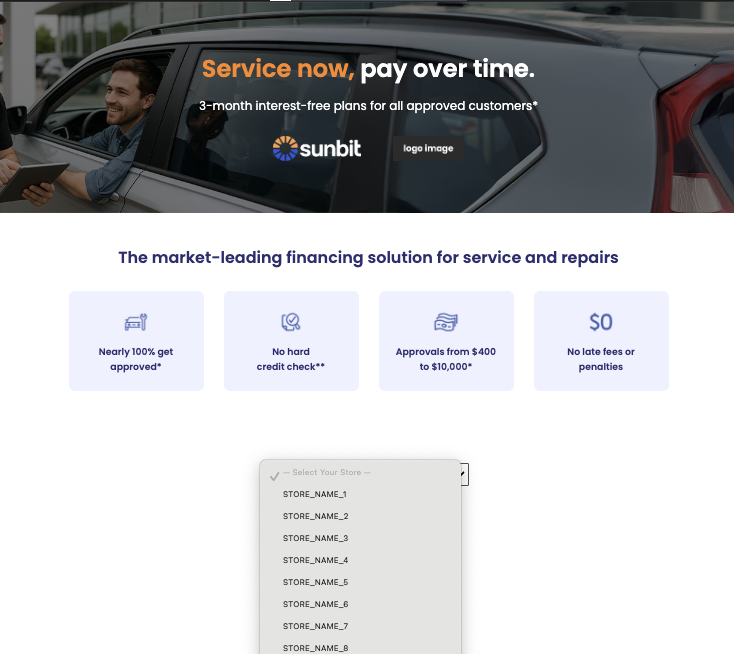
Click to view Multiple Location Iframe Code
<!-- ============================================ -->
<!-- SUNBIT MULTIPLE LOCATION IFRAME -->
<!-- UPDATE: Replace STORE_NAME_1 in the src URL with your store's Sunbit URL slug -->
<!-- Example: src="https://apply.sunbit.com/joes-auto-repair" -->
<!-- ============================================ -->

<!DOCTYPE html>
<html lang="en">
<head>
  <meta charset="UTF-8" />
  <meta name="viewport" content="width=device-width,initial-scale=1" />
  <title>Service Now, Pay Over Time | Sunbit Monthly Payment Options</title>
  <link
    href="https://fonts.googleapis.com/css2?family=Poppins:wght@300;400;500;600;700&display=swap"
    rel="stylesheet"
  >
  <style>
    :root {
      --bg: #ffffff;
      --primary: #6671ff;
      --dark: #2d2d70;
      --btn-bg: #6671ff;
      --btn-text: #fff;
      --max-w: 1200px;
      --gutter: 4rem;
        --hero-overlay: rgba(0,0,0,0.475); /* adjust opacity for contrast */
    }
    * { box-sizing: border-box; margin:0; padding:0; }
    body {
      font-family: "Poppins", sans-serif;
      background: var(--bg);
      color: var(--dark);
      line-height: 1.6;
    }
    .container {
      width: 90%;
      max-width: var(--max-w);
      margin: 0 auto;
    }
    h1, h2, h3 { font-weight: 600; }
    h1 { font-size: 3rem; }
    h2 { font-size: 2rem; margin-bottom: 1rem; }

    #reviews {
      background: #fff;
      padding: var(--gutter) 0;
      margin-top: var(--gutter);
    }
    #reviews h2 {
      text-align: center;
      margin-bottom: 2rem;
    }
    #reviews-container {
      display: grid;
      grid-template-columns: repeat(auto-fit, minmax(250px,1fr));
      gap: 2rem;
    }
    .review {
      padding: 1rem;
      border: 1px solid #ddd;
      border-radius: 8px;
      background: #f9f9fb;
    }
    .review-text {
      font-style: italic;
      margin-bottom: 0.75rem;
    }
    .review-meta {
      font-size: 0.875rem;
      color: #555;
      text-align: right;
    }
    .google-attribution {
      text-align: right;
      font-size: 0.75rem;
      color: #999;
      margin-top: 1rem;
      grid-column: 1 / -1;
    }
    header {
      padding: var(--gutter) 0;
      text-align: center;
    }
    .hero-tagline {
      font-size: 1.5rem;
      margin-top: 1rem;
    }

    .hero {
      position: relative;
      background: url(https://lomcfe.stripocdn.email/content/guids/CABINET_f9a557dc053f245b7784c840f9b82fc1f0dc9c78c26d839a68f3255eb1007412/images/sunbit_stockimage_sausingtablet_QNP.png) center/cover no-repeat;
      padding: 6rem 0;
    }

    .hero::before {
      content: "";
      position: absolute;
      top: 0; left: 0; right: 0; bottom: 0;
      background: var(--hero-overlay);
      z-index: 1;
    }

    .hero-content {
      position: relative;
      z-index: 2;
      color: #fff;
      text-align: center;
    }

    .hero-primary { color: #fd8720; }
    .hero-dark    { color: #FFF; }

    .logo-bar {
      display: inline-flex;
      align-items: center;
      gap: 2rem;
      margin-top: 2rem;
      padding: 0.5rem 1rem;
      border-radius: 8px;
    }
    .logo-bar img { max-height: 50px; }
    .logo-sep {
      width:1px; height:50px;
    }

    #benefits {
      background: #fff;
      padding: var(--gutter) 0;
      text-align: center;
    }
    .features {
      display: grid;
      grid-template-columns: repeat(auto-fit, minmax(240px, 1fr));
      gap: 2.5rem;
      margin-top: 2.5rem;
    }

    .feature-card {
      background: #EEF0FF;
      padding: 2rem;
      border-radius: 12px;
      display: flex;
      flex-direction: column;
      align-items: center;
      text-align: center;
    }
    .feature-card img {
      width: 60px; height:60px;
      margin-bottom: 1rem;
    }

    #cta {
      padding: var(--gutter) 0;
      text-align: center;
    }
    #cta button {
      background: var(--btn-bg);
      color: var(--btn-text);
      padding: 1rem 2rem;
      font-size: 1.25rem;
      border: none;
      border-radius: 999px;
      cursor: pointer;
    }
    #cta select {
      margin-top: 1rem;
      padding: 0.75rem;
      font-size: 1rem;
      width: 80%;
      max-width: 400px;
    }

    #application {
      padding: var(--gutter) 0;
    }
    #application iframe {
      width: 100%;
      min-height: 600px;
      border: none;
    }

    footer {
      background: #e3e8ff;
      padding: 2rem 0;
      font-size: 0.875rem;
      color: #555;
      text-align: center;
    }

    @media (max-width:768px) {
      h1 { font-size: 2.25rem; }
      .hero-tagline { font-size: 1.25rem; }
    }
  </style>
</head>
<body>

<header class="hero">
  <div class="container hero-content">
    <h1>
      <span class="hero-primary">Service now,</span>
      <span class="hero-dark">pay over time.</span>
    </h1>
    <p class="hero-tagline">3-month interest-free plans for all approved customers*</p>
    <div class="logo-bar">
      <img src="https://lomcfe.stripocdn.email/content/guids/CABINET_63ecf041e1bd56bc315c0b1a84b84f05749b77a1c1f00a7888f2940b49b083aa/images/sunbit_logo_white_rgb.png" alt="Partner Logo 1">
      <div class="logo-sep"></div>
      <img src="https://lomcfe.stripocdn.email/content/guids/CABINET_63ecf041e1bd56bc315c0b1a84b84f05749b77a1c1f00a7888f2940b49b083aa/images/logo_image_copy.png" alt="Partner Logo 2">
    </div>
  </div>
</header>

  <section id="benefits" class="container">
    <h2>The market-leading financing solution for service and repairs</h2>
      <div class="features">
      <div class="feature-card">
        <img src="https://lomcfe.stripocdn.email/content/guids/CABINET_f9a557dc053f245b7784c840f9b82fc1f0dc9c78c26d839a68f3255eb1007412/images/auto_nearly100.png" alt="">
        <h3>Nearly 100% get<br>approved*</h3>
      </div>
        <div class="feature-card">
        <img src="https://lomcfe.stripocdn.email/content/guids/CABINET_f9a557dc053f245b7784c840f9b82fc1f0dc9c78c26d839a68f3255eb1007412/images/auto_nohardcreditcheck_3Mp.png" alt="">
        <h3>No hard <br>credit check**</h3>
      </div>
      <div class="feature-card">
        <img src="https://lomcfe.stripocdn.email/content/guids/CABINET_f9a557dc053f245b7784c840f9b82fc1f0dc9c78c26d839a68f3255eb1007412/images/auto_vaapproval.png" alt="">
        <h3>Approvals from $400 to $10,000*</h3>
      </div>
      <div class="feature-card">
        <img src="https://lomcfe.stripocdn.email/content/guids/CABINET_f9a557dc053f245b7784c840f9b82fc1f0dc9c78c26d839a68f3255eb1007412/images/auto_nolatefeesorpenalties_Ejb.png" alt="">
        <h3>No late fees or<br>penalties</h3>
      </div>
    </div>
  </section>

  <section id="cta" class="container">
    <div id="dropdown" class="hidden">
      <select id="practice-select">
        <option value="" disabled selected>— Select Your Store —</option>
        <option value="https://apply.sunbit.com/STORE_NAME_1">STORE_NAME_1</option>
        <option value="https://apply.sunbit.com/STORE_NAME_2">STORE_NAME_2</option>
        <option value="https://apply.sunbit.com/STORE_NAME_3">STORE_NAME_3</option>
        <option value="https://apply.sunbit.com/STORE_NAME_4">STORE_NAME_4</option>
        <option value="https://apply.sunbit.com/STORE_NAME_5">STORE_NAME_5</option>
        <option value="https://apply.sunbit.com/STORE_NAME_6">STORE_NAME_6</option>
        <option value="https://apply.sunbit.com/STORE_NAME_7">STORE_NAME_7</option>
        <option value="https://apply.sunbit.com/STORE_NAME_8">STORE_NAME_8</option>
        <option value="https://apply.sunbit.com/STORE_NAME_9">STORE_NAME_9</option>
        <option value="https://apply.sunbit.com/STORE_NAME_10">STORE_NAME_10</option>
      </select>
    </div>
  </section>

  <section id="application" class="container hidden">
    <iframe id="app-frame" src=""></iframe>
  </section>

  <script>
    document.getElementById('practice-select').addEventListener('change', (e) => {
      const url = e.target.value;
      if (!url) return;
      const appSect = document.getElementById('application');
      document.getElementById('app-frame').src = url;
      appSect.classList.remove('hidden');
      appSect.scrollIntoView({ behavior: 'smooth' });
    });
  </script>
    <footer>
    <p>
*3-month 0% APR plan at participating merchants only. 6-, 9-, 12-, 15-, and 18- month plans subject to interest. Subject to approval based on creditworthiness. 0-35.99% APR. Payment due at checkout. CO: 0-35.99% APR for loans of $1,000 or less; 0-20.99% APR for loans more than $1,000 to $3,000; and 14.99% for loans more than $3,000. CT: 0-35.99% APR for loans less than $5,000; 0-24.99% APR for loans from $5,000 to $50,000. A customer cannot have more than $50,000 in principal at any one time. (lic. #SLC-1760582 & SLC-BCH-1844702). HI: Maximum loan amount of $1,500; 3-month plans not available if loan is more than $500. IA: 0-20.99% APR. MA: 0-17.99% APR for loans less than $1,000; 0-22.99% APR for loans of $1,000 but not more than $6,000; and 0-19.99% APR for loans more than $6,000. MD: 0-23.99% APR. ME: 0-29.99% APR for loans of $2,000 or less; 0-23.99% APR for loans more than $2,000 to $4,000; and 0-17.99% APR for loans more than $4,000. MN: 9-month or longer terms for loans of $1,300 or less. NH: A customer cannot have more than $10,000 principal at any one time. NY: 0-24.99%. VT: 0-18% APR. WV: 0-17.99% APR. Not available in or to residents of US territories. Examples: A $885.00 purchase with 28.99% APR, $133.38 down payment and a 6-month term would have monthly payments of $136.09 and a total cost of $949.93. Actual terms may vary. Alternative recurring payment methods for MLA-covered borrowers. Sunbit Now, LLC, NMLS ID 1760582. Loans are made by Transportation Alliance Bank Inc. dba TAB Bank, which determines qualifications for and terms of credit.

THIS IS A LOAN SOLICITATION ONLY. SUNBIT NOW, LLC IS NOT THE LENDER. INFORMATION RECEIVED WILL BE SHARED WITH ONE OR MORE THIRD PARTIES IN CONNECTION WITH YOUR LOAN INQUIRY. THE LENDER MAY NOT BE SUBJECT TO ALL VERMONT LENDING LAWS. THE LENDER MAY BE SUBJECT TO FEDERAL LENDING LAWS
    </p>
  </footer>
</body>
</html>
- Replace all placeholder text in the STORE LOCATION DROPDOWN section of the code:
- src=”https://apply.sunbit.com/STORE_NAME_1″ with each store’s unique Pre-qualification Link.
- STORE_NAME_1 with the display name for each practice.
- Add as many stores as needed – there’s no limit.
- Paste the code into any HTML-friendly CMS or editor.
- Add a navigation button to your homepage menu titled: “Service now, pay over time” – and link it to the new landing page.
- Upload and display digital banners (provided in the media library) to promote the program and increase visibility.
Web – As Low As Module
If you have specials that you’d like to feature and highlight Sunbit’s “as low as” pricing, simply add your image, product name, price, and optional description, and the module will auto-calculate the ALA pricing for you to use on your website. This module supports up to 9 offers in a 3×3 array.
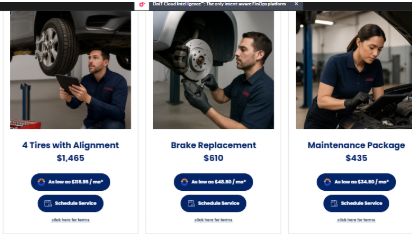
Click to view As Low As Module Code
<!-- ============================================ -->
<!-- SUNBIT AS LOW AS MODULE -->
<!-- ============================================ -->


<!DOCTYPE html>
<html lang="en">
<head>
  <meta charset="UTF-8" />
  <meta name="viewport" content="width=device-width, initial-scale=1" />
  <meta name="description" content="Product Page" />
  <title>Sunbit Service Now, Pay over time</title>

  <!-- Fonts -->
  <link rel="stylesheet" href="style.css">
  <link href="https://fonts.googleapis.com/css2?family=Poppins:wght@300;400;500;600;700&display=swap" rel="stylesheet">

  <style>
    body { font-family: "Poppins", sans-serif; color:#002169; margin:0; padding:0; }

    /* UPDATED: Force true 3x3 on desktop (matches intended 3x3 array) */
    .container {
      display:grid;
      grid-template-columns:repeat(3,1fr);
      grid-gap:20px;
      padding:20px;
      max-width:1200px;
      margin:0 auto;
    }

    /* Tablet */
    @media (max-width:900px){
      .container{ grid-template-columns:repeat(2,1fr); }
    }

    /* Mobile */
    @media (max-width:600px){
      .container{ grid-template-columns:1fr; }
    }

    .product { border:1px solid #ccc; padding:20px; text-align:center; position:relative; }
    .product img { max-width:100%; height:auto; }
    .product-info { margin-top:10px; }
    .buttons { display:flex; flex-direction:column; align-items:center; }
    .buttons a { text-decoration:none; }
    .buttons button {
      margin:5px; display:flex; align-items:center; padding:15px 20px;
      border:none; border-radius:25px; background:#002169; color:#fff;
      cursor:pointer; transition:background-color .3s; font-weight:bold; font-family:"Poppins",sans-serif;
    }
    .buttons button:hover { background-color:#3156ff; }
    .buttons .custom-icon { width:20px; height:auto; margin-right:10px; }
    .popup {
      display:none; position:absolute; top:50%; left:50%; transform:translate(-50%,-50%);
      background-color:rgba(255,255,255,.9); z-index:1; text-align:center; padding:20px; width:130%; box-sizing:border-box;
    }
    .popup p { margin:0; }
    .popup.active { display:block; }
    .product-info img { margin-top:0; }

    /* Keep your original mobile rule (now redundant but harmless; left intact intentionally) */
    @media (max-width:768px){ .container{ grid-template-columns:repeat(auto-fill,minmax(100%,1fr)); } }

    footer { background:#e3e8ff; padding:2rem 0; font-size:.875rem; color:#555; text-align:center; }
  </style>

  <script>
    // --- Sunbit Auto Monthly Pricing Calculator (per your spec) ---
    (function(){
      function parseCurrencyToNumber(str){
        if (!str) return NaN;
        str = String(str);

        // Prefer a $-prefixed amount if present
        const dollarMatches = str.match(/\$\s*\d[\d,]*(?:\.\d{1,2})?/g);
        if (dollarMatches && dollarMatches.length){
          const pick = dollarMatches[dollarMatches.length - 1].replace(/[$,\s]/g,'');
          return parseFloat(pick);
        }

        // Otherwise, grab the last "biggish" number (>= 3 digits) to avoid things like 5W-20
        const numberMatches = str.replace(/,/g,'').match(/\d+(?:\.\d+)?/g);
        if (numberMatches && numberMatches.length){
          const candidates = numberMatches.map(parseFloat).filter(n => !isNaN(n));
          const byThreshold = [...candidates].reverse().find(n => n >= 60);
          return byThreshold ?? parseFloat(candidates[candidates.length - 1]);
        }

        return NaN;
      }

      function computeMonthlyDisplay(price){
        // Rule 1: eligibility filter
        if (!(price >= 60 && price <= 10000)) return "N/A";

        // Rule 2: raw monthly
        const raw = price * 0.07913;

        // Rule 3: rounding to .50 / .95
        const dollars = Math.floor(raw);
        const cents = Math.round((raw - dollars) * 100) / 100;
        const finalVal = (cents <= 0.50) ? (dollars + 0.50) : (dollars + 0.95);

        return finalVal.toLocaleString(undefined, {
          style:"currency", currency:"USD", minimumFractionDigits:2, maximumFractionDigits:2
        });
      }

      function replaceTokenInButton(buttonEl, token, replacement){
        const walker = document.createTreeWalker(buttonEl, NodeFilter.SHOW_TEXT, null);
        const nodes = [];
        while (walker.nextNode()){
          if (walker.currentNode.nodeValue.includes(token)) nodes.push(walker.currentNode);
        }
        nodes.forEach(node => node.nodeValue = node.nodeValue.replace(token, replacement));
      }

      function getPriceForCard(card){
        // 1) Dedicated span wins
        const span = card.querySelector('.price-only');
        if (span && span.textContent) {
          const n = parseCurrencyToNumber(span.textContent);
          if (!isNaN(n)) return n;
        }
        // 2) data-price attribute (if your merge engine fills attributes)
        const attr = card.getAttribute('data-price');
        if (attr){
          const n = parseCurrencyToNumber(attr);
          if (!isNaN(n)) return n;
        }
        // 3) Fallback: scan the H2 text
        const h2 = card.querySelector('h2');
        if (h2){
          const n = parseCurrencyToNumber(h2.textContent);
          if (!isNaN(n)) return n;
        }
        return NaN;
      }

      function initSunbitMonthly(){
        document.querySelectorAll('.product').forEach(card => {
          const priceNum = getPriceForCard(card);
          const monthly  = computeMonthlyDisplay(priceNum);

          const primaryBtn = card.querySelector('.buttons button');
          if (!primaryBtn) return;
          const btnText = primaryBtn.textContent || '';
          const tokenMatch = btnText.match(/\{\{\s*sunbitprice(\d+)\s*\}\}/);
          if (tokenMatch){
            replaceTokenInButton(primaryBtn, tokenMatch[0], monthly);
          }
        });
      }

      document.addEventListener('DOMContentLoaded', initSunbitMonthly);

      // Popup helper
      window.togglePopup = function(id){
        const el = document.getElementById('popup-' + id);
        if (el) el.classList.toggle('active');
      };
    })();
  </script>
</head>

<body>
  <div class="container">

    <!-- Product 1 -->
    <div class="product" data-price="{{price1}}">
      <img src="{{prodimg1}}" alt="Product 1">
      <div class="product-info">
        <h2>{{caption1}}<br><span class="price-only">{{price1}}</span></h2>
        <p>{{desc1}}</p>
        <div class="buttons">
          <a href="{{sunbitlink}}">
            <button>
              <img src="https://khabif.stripocdn.email/content/guids/CABINET_6237606a44efae2087769e1778991535a197ff41fbe3e66bb8eaf6c4d3772860/images/sunbit_sun_logo_only_rgb.png" alt="Sunbit" class="custom-icon">
              As low as {{sunbitprice1}} / mo*
            </button>
          </a>
          <a href="{{schedulelink}}">
            <button>
              <img src="https://lomcfe.stripocdn.email/content/guids/CABINET_ab805e03adb2c4f735a7bda85178fffb304986be0eddc50d97d5be798837e14f/images/calendar_icon.png" alt="Calendar" class="custom-icon">
              Schedule Service
            </button>
          </a>
        </div>
        <img src="https://lomcfe.stripocdn.email/content/guids/CABINET_565f9e06b4e8249b2fc2db4c2ef2c23da1205d09712d774acdfddb6199058e73/images/sunbitala_clickforterms_ajZ.png" alt="Click for terms" onclick="togglePopup(1)">
        <div class="popup" id="popup-1"><p>{{ld1}}</p></div>
      </div>
    </div>

    <!-- Product 2 -->
    <div class="product" data-price="{{price2}}">
      <img src="{{prodimg2}}" alt="Product 2">
      <div class="product-info">
        <h2>{{caption2}}<br><span class="price-only">{{price2}}</span></h2>
        <p>{{desc2}}</p>
        <div class="buttons">
          <a href="{{sunbitlink}}">
            <button>
              <img src="https://khabif.stripocdn.email/content/guids/CABINET_6237606a44efae2087769e1778991535a197ff41fbe3e66bb8eaf6c4d3772860/images/sunbit_sun_logo_only_rgb.png" alt="Sunbit" class="custom-icon">
              As low as {{sunbitprice2}} / mo*
            </button>
          </a>
          <a href="{{schedulelink}}">
            <button>
              <img src="https://lomcfe.stripocdn.email/content/guids/CABINET_ab805e03adb2c4f735a7bda85178fffb304986be0eddc50d97d5be798837e14f/images/calendar_icon.png" alt="Calendar" class="custom-icon">
              Schedule Service
            </button>
          </a>
        </div>
        <img src="https://lomcfe.stripocdn.email/content/guids/CABINET_565f9e06b4e8249b2fc2db4c2ef2c23da1205d09712d774acdfddb6199058e73/images/sunbitala_clickforterms_ajZ.png" alt="Click for terms" onclick="togglePopup(2)">
        <div class="popup" id="popup-2"><p>{{ld2}}</p></div>
      </div>
    </div>

    <!-- Product 3 -->
    <div class="product" data-price="{{price3}}">
      <img src="{{prodimg3}}" alt="Product 3">
      <div class="product-info">
        <h2>{{caption3}}<br><span class="price-only">{{price3}}</span></h2>
        <p>{{desc3}}</p>
        <div class="buttons">
          <a href="{{sunbitlink}}">
            <button>
              <img src="https://khabif.stripocdn.email/content/guids/CABINET_6237606a44efae2087769e1778991535a197ff41fbe3e66bb8eaf6c4d3772860/images/sunbit_sun_logo_only_rgb.png" alt="Sunbit" class="custom-icon">
              As low as {{sunbitprice3}} / mo*
            </button>
          </a>
          <a href="{{schedulelink}}">
            <button>
              <img src="https://lomcfe.stripocdn.email/content/guids/CABINET_ab805e03adb2c4f735a7bda85178fffb304986be0eddc50d97d5be798837e14f/images/calendar_icon.png" alt="Calendar" class="custom-icon">
              Schedule Service
            </button>
          </a>
        </div>
        <img src="https://lomcfe.stripocdn.email/content/guids/CABINET_565f9e06b4e8249b2fc2db4c2ef2c23da1205d09712d774acdfddb6199058e73/images/sunbitala_clickforterms_ajZ.png" alt="Click for terms" onclick="togglePopup(3)">
        <div class="popup" id="popup-3"><p>{{ld3}}</p></div>
      </div>
    </div>

    <!-- Product 4 -->
    <div class="product" data-price="{{price4}}">
      <img src="{{prodimg4}}" alt="Product 4">
      <div class="product-info">
        <h2>{{caption4}}<br><span class="price-only">{{price4}}</span></h2>
        <p>{{desc4}}</p>
        <div class="buttons">
          <a href="{{sunbitlink}}">
            <button>
              <img src="https://khabif.stripocdn.email/content/guids/CABINET_6237606a44efae2087769e1778991535a197ff41fbe3e66bb8eaf6c4d3772860/images/sunbit_sun_logo_only_rgb.png" alt="Sunbit" class="custom-icon">
              As low as {{sunbitprice4}} / mo*
            </button>
          </a>
          <a href="{{schedulelink}}">
            <button>
              <img src="https://lomcfe.stripocdn.email/content/guids/CABINET_ab805e03adb2c4f735a7bda85178fffb304986be0eddc50d97d5be798837e14f/images/calendar_icon.png" alt="Calendar" class="custom-icon">
              Schedule Service
            </button>
          </a>
        </div>
        <img src="https://lomcfe.stripocdn.email/content/guids/CABINET_565f9e06b4e8249b2fc2db4c2ef2c23da1205d09712d774acdfddb6199058e73/images/sunbitala_clickforterms_ajZ.png" alt="Click for terms" onclick="togglePopup(4)">
        <div class="popup" id="popup-4"><p>{{ld4}}</p></div>
      </div>
    </div>

    <!-- Product 5 -->
    <div class="product" data-price="{{price5}}">
      <img src="{{prodimg5}}" alt="Product 5">
      <div class="product-info">
        <h2>{{caption5}}<br><span class="price-only">{{price5}}</span></h2>
        <p>{{desc5}}</p>
        <div class="buttons">
          <a href="{{sunbitlink}}">
            <button>
              <img src="https://khabif.stripocdn.email/content/guids/CABINET_6237606a44efae2087769e1778991535a197ff41fbe3e66bb8eaf6c4d3772860/images/sunbit_sun_logo_only_rgb.png" alt="Sunbit" class="custom-icon">
              As low as {{sunbitprice5}} / mo*
            </button>
          </a>
          <a href="{{schedulelink}}">
            <button>
              <img src="https://lomcfe.stripocdn.email/content/guids/CABINET_ab805e03adb2c4f735a7bda85178fffb304986be0eddc50d97d5be798837e14f/images/calendar_icon.png" alt="Calendar" class="custom-icon">
              Schedule Service
            </button>
          </a>
        </div>
        <img src="https://lomcfe.stripocdn.email/content/guids/CABINET_565f9e06b4e8249b2fc2db4c2ef2c23da1205d09712d774acdfddb6199058e73/images/sunbitala_clickforterms_ajZ.png" alt="Click for terms" onclick="togglePopup(5)">
        <div class="popup" id="popup-5"><p>{{ld5}}</p></div>
      </div>
    </div>

    <!-- Product 6 -->
    <div class="product" data-price="{{price6}}">
      <img src="{{prodimg6}}" alt="Product 6">
      <div class="product-info">
        <h2>{{caption6}}<br><span class="price-only">{{price6}}</span></h2>
        <p>{{desc6}}</p>
        <div class="buttons">
          <a href="{{sunbitlink}}">
            <button>
              <img src="https://khabif.stripocdn.email/content/guids/CABINET_6237606a44efae2087769e1778991535a197ff41fbe3e66bb8eaf6c4d3772860/images/sunbit_sun_logo_only_rgb.png" alt="Sunbit" class="custom-icon">
              As low as {{sunbitprice6}} / mo*
            </button>
          </a>
          <a href="{{schedulelink}}">
            <button>
              <img src="https://lomcfe.stripocdn.email/content/guids/CABINET_ab805e03adb2c4f735a7bda85178fffb304986be0eddc50d97d5be798837e14f/images/calendar_icon.png" alt="Calendar" class="custom-icon">
              Schedule Service
            </button>
          </a>
        </div>
        <img src="https://lomcfe.stripocdn.email/content/guids/CABINET_565f9e06b4e8249b2fc2db4c2ef2c23da1205d09712d774acdfddb6199058e73/images/sunbitala_clickforterms_ajZ.png" alt="Click for terms" onclick="togglePopup(6)">
        <div class="popup" id="popup-6"><p>{{ld6}}</p></div>
      </div>
    </div>

    <!-- Product 7 -->
    <div class="product" data-price="{{price7}}">
      <img src="{{prodimg7}}" alt="Product 7">
      <div class="product-info">
        <h2>{{caption7}}<br><span class="price-only">{{price7}}</span></h2>
        <p>{{desc7}}</p>
        <div class="buttons">
          <a href="{{sunbitlink}}">
            <button>
              <img src="https://khabif.stripocdn.email/content/guids/CABINET_6237606a44efae2087769e1778991535a197ff41fbe3e66bb8eaf6c4d3772860/images/sunbit_sun_logo_only_rgb.png" alt="Sunbit" class="custom-icon">
              As low as {{sunbitprice7}} / mo*
            </button>
          </a>
          <a href="{{schedulelink}}">
            <button>
              <img src="https://lomcfe.stripocdn.email/content/guids/CABINET_ab805e03adb2c4f735a7bda85178fffb304986be0eddc50d97d5be798837e14f/images/calendar_icon.png" alt="Calendar" class="custom-icon">
              Schedule Service
            </button>
          </a>
        </div>
        <img src="https://lomcfe.stripocdn.email/content/guids/CABINET_565f9e06b4e8249b2fc2db4c2ef2c23da1205d09712d774acdfddb6199058e73/images/sunbitala_clickforterms_ajZ.png" alt="Click for terms" onclick="togglePopup(7)">
        <div class="popup" id="popup-7"><p>{{ld7}}</p></div>
      </div>
    </div>

    <!-- Product 8 -->
    <div class="product" data-price="{{price8}}">
      <img src="{{prodimg8}}" alt="Product 8">
      <div class="product-info">
        <h2>{{caption8}}<br><span class="price-only">{{price8}}</span></h2>
        <p>{{desc8}}</p>
        <div class="buttons">
          <a href="{{sunbitlink}}">
            <button>
              <img src="https://khabif.stripocdn.email/content/guids/CABINET_6237606a44efae2087769e1778991535a197ff41fbe3e66bb8eaf6c4d3772860/images/sunbit_sun_logo_only_rgb.png" alt="Sunbit" class="custom-icon">
              As low as {{sunbitprice8}} / mo*
            </button>
          </a>
          <a href="{{schedulelink}}">
            <button>
              <img src="https://lomcfe.stripocdn.email/content/guids/CABINET_ab805e03adb2c4f735a7bda85178fffb304986be0eddc50d97d5be798837e14f/images/calendar_icon.png" alt="Calendar" class="custom-icon">
              Schedule Service
            </button>
          </a>
        </div>
        <img src="https://lomcfe.stripocdn.email/content/guids/CABINET_565f9e06b4e8249b2fc2db4c2ef2c23da1205d09712d774acdfddb6199058e73/images/sunbitala_clickforterms_ajZ.png" alt="Click for terms" onclick="togglePopup(8)">
        <div class="popup" id="popup-8"><p>{{ld8}}</p></div>
      </div>
    </div>

    <!-- Product 9 -->
    <div class="product" data-price="{{price9}}">
      <img src="{{prodimg9}}" alt="Product 9">
      <div class="product-info">
        <h2>{{caption9}}<br><span class="price-only">{{price9}}</span></h2>
        <p>{{desc9}}</p>
        <div class="buttons">
          <a href="{{sunbitlink}}">
            <button>
              <img src="https://khabif.stripocdn.email/content/guids/CABINET_6237606a44efae2087769e1778991535a197ff41fbe3e66bb8eaf6c4d3772860/images/sunbit_sun_logo_only_rgb.png" alt="Sunbit" class="custom-icon">
              As low as {{sunbitprice9}} / mo*
            </button>
          </a>
          <a href="{{schedulelink}}">
            <button>
              <img src="https://lomcfe.stripocdn.email/content/guids/CABINET_ab805e03adb2c4f735a7bda85178fffb304986be0eddc50d97d5be798837e14f/images/calendar_icon.png" alt="Calendar" class="custom-icon">
              Schedule Service
            </button>
          </a>
        </div>
        <img src="https://lomcfe.stripocdn.email/content/guids/CABINET_565f9e06b4e8249b2fc2db4c2ef2c23da1205d09712d774acdfddb6199058e73/images/sunbitala_clickforterms_ajZ.png" alt="Click for terms" onclick="togglePopup(9)">
        <div class="popup" id="popup-9"><p>{{ld9}}</p></div>
      </div>
    </div>

  </div>

  <footer>
    <p>
      *3-month 0% APR plan at participating merchants only. 6-, 9-, 12-, 15-, and 18- month plans subject to interest. Subject to approval based on creditworthiness. 0-35.99% APR. Payment due at checkout. CO: 0-35.99% APR for loans of $1,000 or less; 0-20.99% APR for loans more than $1,000 to $3,000; and 14.99% for loans more than $3,000. CT: 0-35.99% APR for loans less than $5,000; 0-24.99% APR for loans from $5,000 to $50,000. A customer cannot have more than $50,000 in principal at any one time. (lic. #SLC-1760582 & SLC-BCH-1844702). HI: Maximum loan amount of $1,500; 3-month plans not available if loan is more than $500. IA: 0-20.99% APR. MA: 0-17.99% APR for loans less than $1,000; 0-22.99% APR for loans of $1,000 but not more than $6,000; and 0-19.99% APR for loans more than $6,000. MD: 0-23.99% APR. ME: 0-29.99% APR for loans of $2,000 or less; 0-23.99% APR for loans more than $2,000 to $4,000; and 0-17.99% APR for loans more than $4,000. MN: 9-month or longer terms for loans of $1,300 or less. NH: A customer cannot have more than $10,000 principal at any one time. NY: 0-24.99%. VT: 0-18% APR. WV: 0-17.99% APR. Not available in or to residents of US territories. Examples: A $885.00 purchase with 28.99% APR, $133.38 down payment and a 6-month term would have monthly payments of $136.09 and a total cost of $949.93. Actual terms may vary. Alternative recurring payment methods for MLA-covered borrowers. Sunbit Now, LLC, NMLS ID 1760582. Loans are made by Transportation Alliance Bank Inc. dba TAB Bank, which determines qualifications for and terms of credit.

THIS IS A LOAN SOLICITATION ONLY. SUNBIT NOW, LLC IS NOT THE LENDER. INFORMATION RECEIVED WILL BE SHARED WITH ONE OR MORE THIRD PARTIES IN CONNECTION WITH YOUR LOAN INQUIRY. THE LENDER MAY NOT BE SUBJECT TO ALL VERMONT LENDING LAWS. THE LENDER MAY BE SUBJECT TO FEDERAL LENDING LAWS

    </p>
  </footer>
</body>
</html>
- Replace all placeholder text in the code:
- IMAGE URL with the URL to a preferred image you’d like to use.
- EXAMPLE with the product or offer name (ie: 4 Tires with alignment, Maintenance Package, etc).
- DESCRIPTION with an optional description or details for this offer.
- PRICE with the actual cost of the service – this must be over $60 to work with Sunbit.
- Add up to 9 offers.
- Paste the entire HTML snippet into the appropriate section of your existing webpage.
- This should be done in an HTML-friendly CMS or directly in the source code.
- Position it where you’d like the widget to appear (ie: in your financing, payment options, or new customer info section).
Appointments Page
On the appointments form, add a question that asks: